> For the complete documentation index, see [llms.txt](https://guides.camunlocks.com/llms.txt). Markdown versions of documentation pages are available by appending `.md` to page URLs; this page is available as [Markdown](https://guides.camunlocks.com/getting-started/dma-tool.md).
# DMA Tool
The CamUnlocks DMA Tool tests your DMA card, installs its drivers, reads its DNA ID and flashes its firmware, all from one app on your second PC.
The DMA Tool does every DMA card job in one app: it checks your card and its drivers, installs anything that is missing, runs a speed test, reads your DNA ID and flashes firmware. It checks its own work too: it will not flash a file made for a different chip, and it checks the same card is still connected before it writes.
{% hint style="info" %}
**Where everything goes:** the DMA card is installed in your **Game PC**. The DMA Tool runs on your **2nd PC**, the one the card's USB cable plugs into.
{% endhint %}
{% stepper %}
{% step %}
### Download and install
Download the DMA Tool
1. Run `CamUnlocksDMATool-win-Setup.exe` on your **2nd PC**.
2. When Windows shows a blue **SmartScreen** notice, click **More info**, then **Run anyway**.
3. The tool installs itself and opens. It does not need administrator rights, and it adds a shortcut to your desktop and Start menu.
This link always gives you the newest version. Prefer not to install anything? Use the [**portable version**](https://github.com/camwithadot/CamUnlocksDMATool-releases/releases/latest/download/CamUnlocksDMATool-win-Portable.zip) instead. Unzip it and run `CamUnlocks DMA Tool.exe`. The portable version does not update itself, so download it again when a new version comes out.
{% endstep %}
{% step %}
### Use the right port on your card
Most cards have two USB ports and you move the one cable between them. On 35T cards with a USB-C adapter, switch the adapter between **DATA** and **JTAG** mode instead:
* **DATA port:** the full test, the speed test and everyday use. Your cheat software also uses this port.
* **JTAG / UPDATE port:** reading your DNA ID, flashing firmware and **Read the chip**.
Keep your **Game PC** switched on whenever you use the tool. The card is powered from its PCIe slot.
{% endstep %}
{% step %}
### Install drivers if the tool asks
If a driver is missing, a red banner appears across the top of every page:
* **The card driver is not installed.** Click **Install driver**. If the banner is still there a few seconds later, unplug the card's USB cable and plug it back in.
* **The JTAG driver is not installed.** Click **Install driver**.
Click **Yes** when Windows asks for permission. The banner disappears on its own once Windows has loaded the driver.
{% endstep %}
{% step %}
### Run the full test
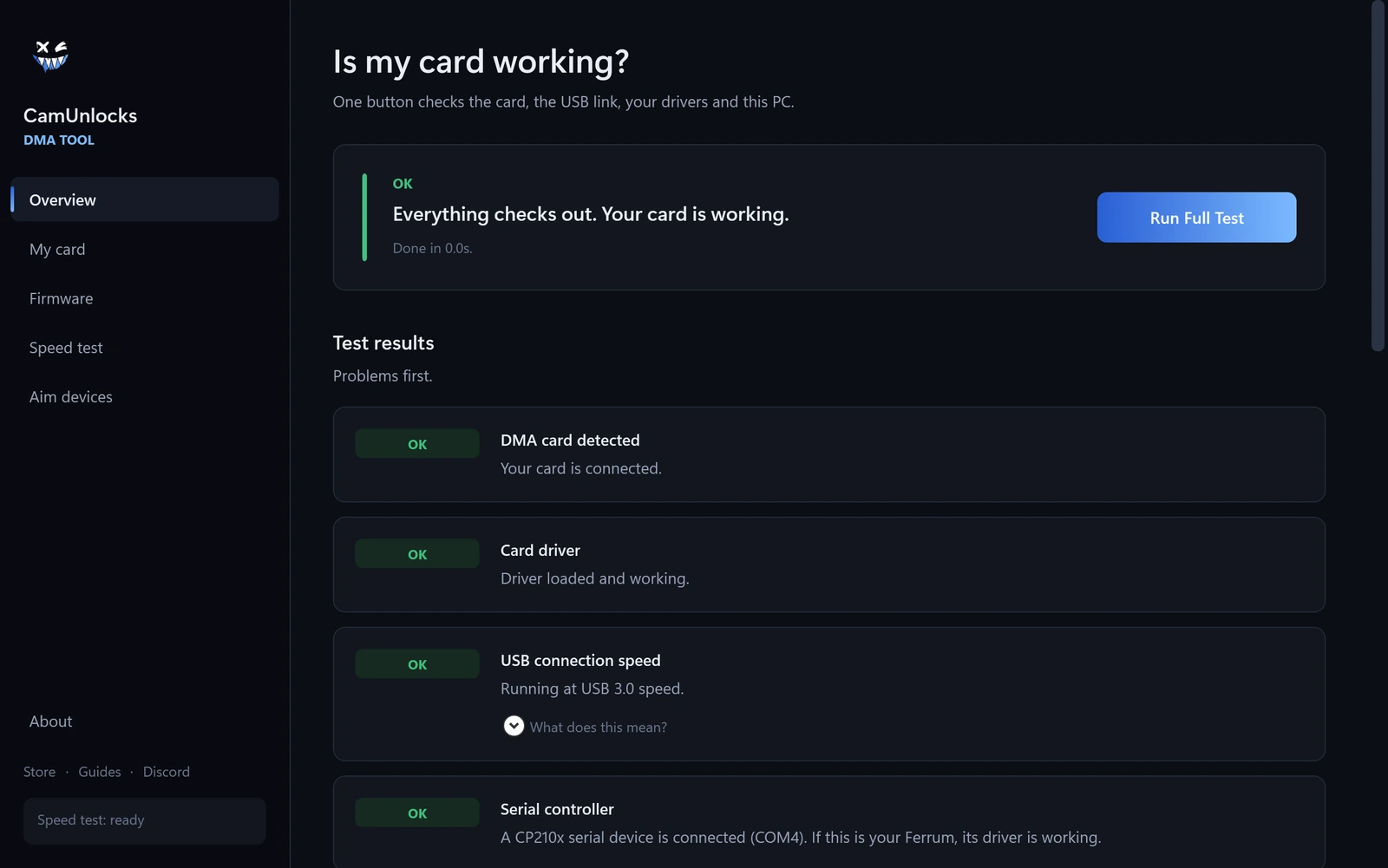
With the cable in the **DATA port**, open **Overview** and press **Run Full Test**. In a few seconds the results appear underneath, problems first, and every problem tells you what to do about it.
If everything is green, your card is working.
{% endstep %}
{% endstepper %}
### What each page does
* **Overview:** the full test, which checks your card, its drivers, the USB connection, how the card shows up on your Game PC, and its read speed. Your support report is at the bottom of the results.
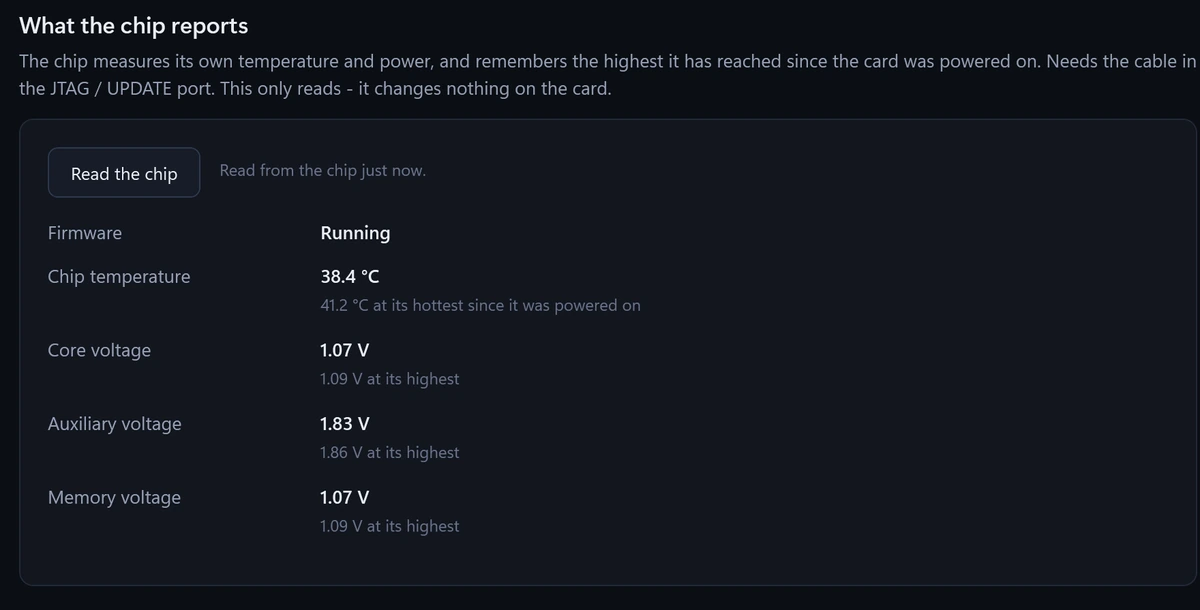
* **My card:** what the tool knows about your card, plus **Read the chip** (see below).
* **Firmware:** read your [**DNA ID**](/dma-hardware-guides/dma-firmware/dna-id.md) and flash firmware ([**35T**](/dma-hardware-guides/dma-firmware/35t-firmware-flashing.md), [**75T/100T**](/dma-hardware-guides/dma-firmware/75t-100t-firmware-flashing.md)).
* **Speed test:** measure how fast your card is. See [**Speed Test**](/dma-hardware-guides/dma-card/speed-test-2nd-pc.md).
* **Aim devices:** test a MAKCU. It moves the cursor on your Game PC in a small square so you can see it working.
* **About:** change the language and check for updates. The tool is available in English, German, Russian, Spanish, Portuguese, Chinese and Arabic.
### Send us a support report
After a full test, the **Support report** card sits at the bottom of the results. Press **Copy report** and paste it into your ticket in our [**Discord**](https://discord.camunlocks.com/). It only contains hardware and Windows settings: no personal information, no account details and no file paths.
### See what your card's chip reports
With the cable in the **JTAG / UPDATE port**, open **My card** and press **Read the chip**. The chip reports its own temperature, the hottest it has been since your Game PC was switched on, and its power readings. If its firmware is not running, it says why, for example a firmware image that failed its checksum. This only reads. It changes nothing on your card.
{% hint style="success" %}
**The tool updates itself.** When a newer version is out, it downloads it in the background and installs it when you close the tool, so you are on the newest version the next time you open it. A banner at the top offers **Install now** if you would rather not wait. Do not press it while a flash is running.
{% endhint %}
### If the DMA Tool will not work
Every job the tool does can still be done by hand. See the [**Manual Method (Backup)**](/dma-hardware-guides/manual-method.md) guides, and open a ticket in our [**Discord**](https://discord.camunlocks.com/) so we can look at what went wrong.